Running Qwen 35B MoE at 450k Context on a Single 32GB GPU
This report details the configuration and memory calibration required to run the Qwen 3.6 35B MoE (35B-A3B) model at an extended context window of 450,000 tokens on a single 32GB VRAM GPU (NVIDIA RTX 5090) using llama.cpp.
This setup is fully implemented and running under Windows, which was chosen as the single host operating system for the RTX 5090 workstation to avoid dual-boot overhead. The guide focuses on Windows-native scripts (Batch and PowerShell) and compiled DLL management, but the core execution parameters and performance calibrations remain fully applicable to Linux deployments with minor path adjustments.
1. Model Selection & Quantization Trade-offs
The model selected for this setup is Qwen3.6-35B-A3B-Q6_K.gguf (28.5GB).
- Architecture (MoE): Qwen 3.5/3.6 MoE utilizes a Mixture of Experts architecture where only ~3 billion parameters are active per token out of 35 billion total. This maintains execution speeds comparable to small models while retaining the reasoning capabilities of larger models.
- Quantization (Q6_K): While Q4_K_M or Q5_K_S would reduce the VRAM footprint further, Q6_K was selected to preserve logical accuracy and syntax structure for complex code generation, maintaining over 99% of the native BF16 perplexity.
2. Memory Budget & Context Calibration
On a GPU with 32GB of physical VRAM (32,607 MiB visible via nvidia-smi), the memory budget is constrained:
- Model Weights (Q6_K): 28.5GB.
- Static Overhead & OS: ~0.8GB.
- VRAM Margin for Context: ~2.7GB.
A. KV Cache Quantization via TurboQuant (turbo3)
We compress the KV cache tensors to 3-bit precision using the TurboQuant formats:
-
--cache-type-k turbo3 -
--cache-type-v turbo3
llama.cpp yet. The CUDA 12 build of this fork was explicitly chosen for its stability and current performance characteristics, even on hosts running newer CUDA drivers).
This compression reduces the KV cache footprint by approximately 80%, allowing the 450k context window to fit within the remaining 2.7GB VRAM buffer. Quantizing the cache to 3-bit introduces a minor but measurable perplexity degradation.
B. RoPE Scaling via YaRN and Perplexity Degradation
The native context length of Qwen 3.5/3.6 MoE is 262,144 tokens. To extend the context window to 450,000 tokens, we apply YaRN (Yet another RoPE extensioN) scaling:
-
--rope-scaling yarn --yarn-orig-ctx 262144 --rope-scale 1.72
3. Multimodal (Vision) Projector Setup
To support image inputs, the model requires its corresponding vision projector (mmproj):
1. Download the matching projector: Qwen3.6-35B-A3B-mmproj-F16.gguf (899MB).
2. Load it in the server using the --mmproj argument.
Limitation
The image decoder compiled into llama.cpp uses the stb_image library. It supports PNG and JPEG formats, but does not support WebP. WebP files sent to the API return a 400 Bad Request (Failed to load image or audio file) error.
4. Technical Replication Guide
Step 1: Secure Model Acquisition
This script retrieves the GGUF model and its vision projector from Hugging Face Hub using your local token:
# download_model.py
import os
from huggingface_hub import hf_hub_download

REPO_ID = "jimbothigpen/Qwen3.6-35B-A3B-GGUF"
FILES = ["Qwen3.6-35B-A3B-Q6_K.gguf", "Qwen3.6-35B-A3B-mmproj-F16.gguf"]
LOCAL_DIR = "./models"
TOKEN = os.environ.get("HF_TOKEN")

for filename in FILES:
    hf_hub_download(repo_id=REPO_ID, filename=filename, local_dir=LOCAL_DIR, token=TOKEN)
Step 2: Server Invocation Arguments
Start the llama-server process with the following flags:
./llama-server.exe ^
  -m "./models/Qwen3.6-35B-A3B-Q6_K.gguf" ^
  --mmproj "./models/Qwen3.6-35B-A3B-mmproj-F16.gguf" ^
  --no-mmap ^
  --port 9000 ^
  --host 0.0.0.0 ^
  -ngl 99 ^
  -c 450000 ^
  --rope-scaling yarn ^
  --yarn-orig-ctx 262144 ^
  --rope-scale 1.72 ^
  --cache-type-k turbo3 ^
  --cache-type-v turbo3 ^
  --flash-attn on ^
  -b 512 ^
-ub 512^ with \).
-
--no-mmap: Disables memory-mapping, forcing all model weights to load contiguously into VRAM. This prevents OS paging bottlenecks during inference. -
--flash-attn: Activates Flash Attention, reducing memory overhead and accelerating computations on compatible NVIDIA architectures. -
-ngl 99: Offloads all 40 model layers plus the output tensor to the GPU.
5. Automated VRAM Lifecycle Management (Go Wrapper)
Since the model and context occupy nearly 100% of the GPU memory, leaving the server running in the background causes severe VRAM bottlenecks for other applications (such as graphics drivers or web browsers).
To solve this, we implemented a lightweight Go (Gin Gonic) manager that runs as a Windows Service (or Linux systemd daemon):
- On-Demand Lifecycle: Exposes a web dashboard to start the server when needed and stop it cleanly (killing the process) to release 100% of VRAM instantly.
- Status Polling: Pings the local port
9000via TCP every 3 seconds to confirm when the HTTP server is listening, and parses logs in real-time to check GPU offloading status.
6. Performance Evaluation & Code Generation
With this configuration, the model can digest large codebases or logs, and generate complex scripts in a single shot.
As a test case, the model was given the following prompt:
"write me an index.html with a Three.js app that displays a cool textured video game character (mario or other) that you find on the web. single page"
The model successfully generated a complete, interactive 3D scene using Canvas-generated textures for Mario, question blocks, and pipes. The code compiled and rendered in one shot with orbit controls and basic animation loops.
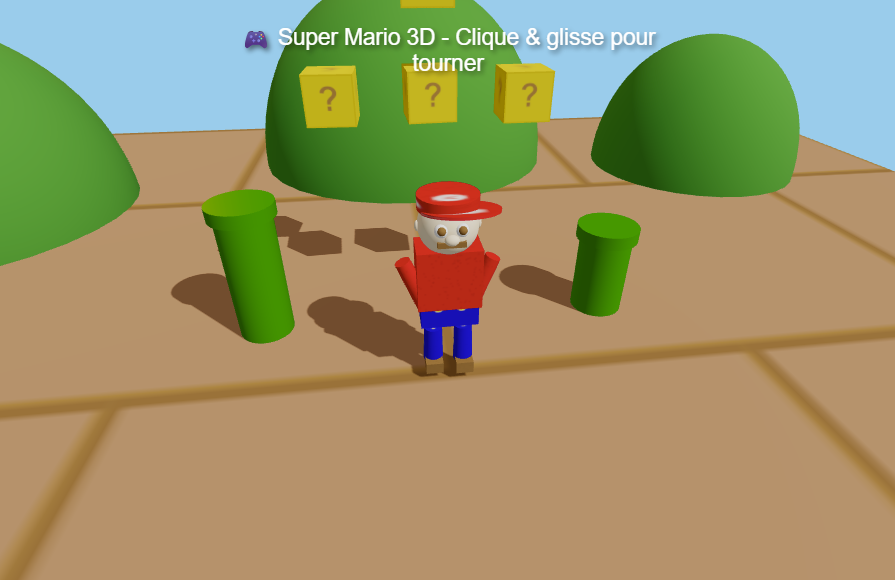
👉 View and test the generated application live (mario.html)
7. Client Integration (OpenCode)
To use this local endpoint as a development assistant (e.g. in OpenCode) with multimodal capabilities, configure the "modalities" block in your local opencode.json configuration file:
"llamacpp": {
  "npm": "@ai-sdk/openai-compatible",
  "name": "llamacpp",
  "options": {
    "baseURL": "http://127.0.0.1:9000/v1"
  },
  "models": {
    "qwen3.6-35b-q6-450k": {
      "name": "qwen3.6-35b-q6-450k",
      "limit": {
        "context": 450000,
        "input": 450000,
        "output": 8192
      },
      "modalities": {
        "input": ["text", "image"],
        "output": ["text"]
      }
    }
  }
}
Defining "modalities" allows the OpenCode client to recognize that the model supports image inputs, unlocking image drag-and-drop support inside the editor chat interface.
8. Conclusion
Running a 35B Mixture of Experts model at a 450k context window on consumer hardware is a demonstration of how far local inference optimizations have progressed. By combining llama.cpp, TurboQuant (3-bit KV cache), and YaRN scaling, a single 32GB VRAM GPU can handle extremely large prompts.
However, this setup operates at the absolute physical limits of a 32GB frame buffer, leaving virtually no margin for dynamic memory allocation. More importantly, users must remain aware that expanding context via YaRN scaling beyond the model's native 262k token limit comes with a significant compromise in retrieval fidelity and logical reasoning accuracy. For critical workloads, keeping context sizes within the native bounds remains the most reliable path, while the 450k limit is best reserved for exploratory search and broad summarization tasks.